对开发笔记的补充
说明:首段内容为新模块的开发代码,篇幅较长,可通过快捷键
W打开左侧大纲视图,便于查看。
完成网站主体(项目导航模块)
1. 数据表设计
注:在最初的需求分析阶段,由于规划了较多功能,部分字段预先设计但尚未实际实现。
- 项目表
create table project
(
    id           bigint auto_increment comment 'id'
        primary key,
    title        varchar(128)                       not null comment '项目标题',
    description  varchar(256)                      null comment '项目简短描述',
    content      text                               null comment '项目详细内容',
    img          varchar(256)                      null comment '项目封面图片',
    href         varchar(128)                      null comment '项目链接',
    avatar       varchar(256)                      null comment '项目头像',
    userId       bigint                             not null comment '创建者用户id',
    viewCount    int      default 0                 not null comment '浏览量',
    likeCount    int      default 0                 not null comment '点赞数',
    commentCount int      default 0                 not null comment '评论数',
    status       int      default 0                 not null comment '状态 0-正常 1-隐藏',
    sort         int      default 0                 not null comment '排序权重',
    isCarousel   tinyint  default 0                 not null comment '是否加入轮播图 0-否 1-是',
    createTime   datetime default CURRENT_TIMESTAMP null comment '创建时间',
    updateTime   datetime default CURRENT_TIMESTAMP null on update CURRENT_TIMESTAMP,
    isDelete     tinyint  default 0                 not null comment '是否删除'
)
    comment '项目' charset = utf8mb4;
- 项目评论表
create table project_comment
(
    id         bigint auto_increment comment 'id'
        primary key,
    content    text                               not null comment '评论内容',
    projectId  bigint                             not null comment '项目id',
    userId     bigint                             not null comment '评论用户id',
    parentId   bigint   default 0                 null comment '父评论id,0表示一级评论',
    likeCount  int      default 0                 not null comment '点赞数',
    status     int      default 0                 not null comment '状态 0-正常 1-隐藏',
    createTime datetime default CURRENT_TIMESTAMP null comment '创建时间',
    updateTime datetime default CURRENT_TIMESTAMP null on update CURRENT_TIMESTAMP,
    isDelete   tinyint  default 0                 not null comment '是否删除',
    userName   varchar(100)                       not null comment '用户昵称',
    avatarUrl  varchar(255)                       not null comment '头像'
)
    comment '评论' charset = utf8mb4;
- 点赞表
create table project_like
(
    id         bigint auto_increment comment 'id'
        primary key,
    userId     bigint                             not null comment '用户id',
    projectId  bigint                             not null comment '项目id',
    commentId  bigint   default 0                 null comment '评论id,0表示对项目点赞',
    createTime datetime default CURRENT_TIMESTAMP null comment '创建时间',
    updateTime datetime default CURRENT_TIMESTAMP null on update CURRENT_TIMESTAMP,
    isDelete   tinyint  default 0                 not null comment '是否删除',
    constraint idx_user_project_comment
        unique (userId, projectId, commentId, isDelete)
)
    comment '点赞' charset = utf8mb4;
2. 基本框架生成
2.1 使用 MyBatisX 插件 自动生成相关代码(domain、mapper、mapper.xml、service、serviceImpl)
- 操作流程:
右键点击目标数据表 → MyBatisX-Generator → Next →
勾选选项:MyBatis-Plus3、Comment(字段注释)、Actual Column(实际字段名)、Model(生成 domain)、Lombok(使用注解)→ Finish。 - 提示:支持多表选择,并可生成到对应的包路径下。
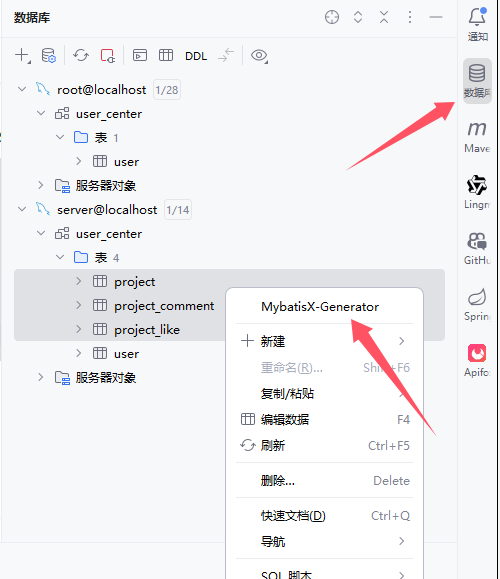
- 注意,这里可以多选,同时生成在对应包内

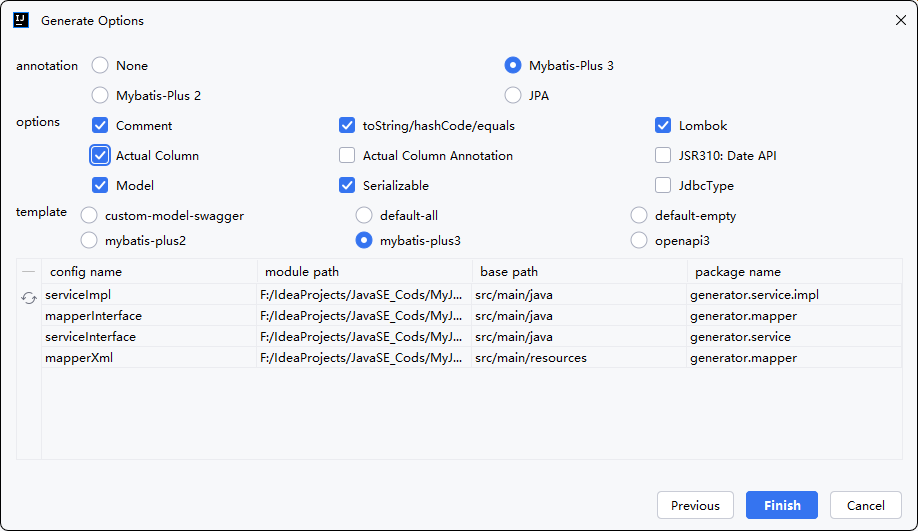
2.2 项目列表(展示页/管理页)
- 前台分页查询,按项目名模糊查询:
/**
     * 获取项目列表(前台)
     */
    @GetMapping("/list")
    public BaseResponse<Page<Project>> getProjects(
            @RequestParam(defaultValue = "1") long current,
            @RequestParam(defaultValue = "10") long pageSize) {

        QueryWrapper<Project> queryWrapper = new QueryWrapper<>();
        queryWrapper.eq("status", 0); // 只显示正常状态的项目
        queryWrapper.orderByDesc("sort", "createTime");

        Page<Project> page = new Page<>(current, pageSize);
        Page<Project> result = projectService.page(page, queryWrapper);

        return ResultUtils.success(result);
    }
/**
     * 管理员获取项目列表
     */
    @GetMapping("/admin/list")
    public BaseResponse<Page<Project>> getProjectListForAdmin(
            @RequestParam(required = false) String title,
            @RequestParam(defaultValue = "1") long current,
            @RequestParam(defaultValue = "10") long pageSize) {

        QueryWrapper<Project> queryWrapper = new QueryWrapper<>();
        if (title != null && !title.trim().isEmpty()) {
            queryWrapper.like("title", title);
        }
        queryWrapper.orderByDesc("createTime");

        Page<Project> page = new Page<>(current, pageSize);
        Page<Project> result = projectService.page(page, queryWrapper);

        return ResultUtils.success(result);
    }
- service 层实现:调用 MyBatis-Plus 提供的分页查询方法。
2.3 项目详情
/**
     * 获取项目详情
     */
    @GetMapping("/detail/{id}")
    public BaseResponse<Project> getProjectDetail(@PathVariable Long id) {
        Project project = projectService.getById(id);
        if (project == null) {
            return ResultUtils.error(ErrorCode.PARAMS_ERROR, "项目不存在");
        }
        return ResultUtils.success(project);
    }
- service 层实现:调用 mybatis-plus 提供的
getById方法完成简单查询。
2.4 记录项目浏览量
/**
     * 点赞项目
     */
    @PostMapping("/like/{id}")
    public BaseResponse<Boolean> likeProject(@PathVariable Long id, HttpServletRequest request) {
        // 从session或token中获取用户ID
        Long userId = getCurrentUserId(request);
        boolean result = projectService.likeProject(id, userId);
        return ResultUtils.success(result);
    }
2.5 点赞模块
- 点赞需绑定用户 ID。
- 每位用户只能对项目点赞一次,防止重复点赞。
/**
     * 点赞项目
     */
    @PostMapping("/like/{id}")
    public BaseResponse<Boolean> likeProject(@PathVariable Long id, HttpServletRequest request) {
        // 从session或token中获取用户ID
        Long userId = getCurrentUserId(request);
        boolean result = projectService.likeProject(id, userId);
        return ResultUtils.success(result);
    }
/**
     * 检查点赞状态
     */
    @GetMapping("/like/check/{id}")
    public BaseResponse<Boolean> checkLikeStatus(@PathVariable Long id, HttpServletRequest request) {
        Long userId = getCurrentUserId(request);
        boolean hasLiked = projectService.hasLiked(id, userId);
        return ResultUtils.success(hasLiked);
    }
service 层实现说明:
- 点赞状态检查方法可进行抽取复用:
@Override public boolean hasLiked(Long projectId, Long userId) { QueryWrapper<ProjectLike> queryWrapper = new QueryWrapper<>(); queryWrapper.eq("projectId", projectId); queryWrapper.eq("userId", userId); return projectLikeMapper.selectCount(queryWrapper) > 0; }- 点赞实现
@Override
    @Transactional
    public boolean likeProject(Long projectId, Long userId) {
        // 检查是否已经点赞
        if (hasLiked(projectId, userId)) {
            return false;
        }

        // 添加点赞记录
        ProjectLike projectLike = new ProjectLike();
        projectLike.setProjectId(projectId);
        projectLike.setUserId(userId);
        int result = projectLikeMapper.insert(projectLike);

        // 更新项目点赞数
        if (result > 0) {
            Project project = this.getById(projectId);
            if (project != null) {
                project.setLikeCount(project.getLikeCount() + 1);
                this.updateById(project);
            }
        }
        return result > 0;
    }
2.6 项目的 CRUD 操作
添加项目时注意表关系
对获取用户id进行抽取,方便复用
private Long getCurrentUserId(HttpServletRequest request) {
        // 这里需要根据你的认证方式来获取用户ID
        Object userObj = request.getSession().getAttribute(UserConstant.USER_LOGIN_STATE);
        User currentUser = (User) userObj;
        if (currentUser == null) {
            throw new BusinessException(ErrorCode.NOT_LOGIN);
        }
        long userId = currentUser.getId();
        return userId;
    }
/**
     * 添加项目
     */
    @PostMapping("/add")
    public BaseResponse<Boolean> addProject(@RequestBody Project project,HttpServletRequest request) {
        Object userObj = request.getSession().getAttribute(UserConstant.USER_LOGIN_STATE);
        User currentUser = (User) userObj;
        if (currentUser == null) {
            throw new BusinessException(ErrorCode.NOT_LOGIN);
        }
        project.setUserId(currentUser.getId());
        project.setAvatar(currentUser.getAvatarUrl());
        project.setCreateTime(new Date());
        project.setUpdateTime(new Date());
        boolean result = projectService.save(project);
        //同步创建点赞表
        ProjectLike projectLike = new ProjectLike();
        projectLike.setProjectId(project.getId());
        projectLike.setUserId(currentUser.getId());
        projectLike.setCreateTime(new Date());
        projectLikeMapper.insert(projectLike);
        return ResultUtils.success(result);
    }

    /**
     * 更新项目
     */
    @PutMapping("/update")
    public BaseResponse<Boolean> updateProject(@RequestBody Project project,HttpServletRequest request) {
        Object userObj = request.getSession().getAttribute(UserConstant.USER_LOGIN_STATE);
        User currentUser = (User) userObj;
        if (currentUser == null) {
            throw new BusinessException(ErrorCode.NOT_LOGIN);
        }

        project.setUpdateTime(new Date());
        project.setUserId(currentUser.getId());
        boolean result = projectService.updateById(project);
        return ResultUtils.success(result);
    }

    /**
     * 删除项目
     */
    @PostMapping("/delete")
    public BaseResponse<Boolean> deleteProject(@RequestBody Long id) {
        boolean result = projectService.removeById(id);
        return ResultUtils.success(result);
    }
3. 前端实现
由于前端重复性代码较多,这里只给出关键步骤,可以锻炼前端crud基本工,如需源代码可以联系我
3.1 API接口设计
- 先与后端对齐接口
getProjects()          // 获取项目列表
getProjectDetail()     // 获取项目详情
addProject()           // 添加项目
updateProject()        // 更新项目
deleteProject()        // 删除项目
likeProject()          // 点赞功能
addComment()           // 评论功能
viewProject()          // 浏览量统计
3.2 首页展示设计
- 在
HomePage.vue中实现轮播图
<a-carousel autoplay class="carousel">
  <div v-for="(item, index) in carouselItems" :key="index">
    // 展示 isCarousel=1 的项目
  </div>
</a-carousel>
- 项目列表展示
- 分页功能
- 点赞、评论、浏览量统计
- 项目详情弹窗
3.3 项目详情页面设计
ProjectDetailPage.vue 实现:
- 项目完整信息展示
- 点赞功能
- 评论系统
- 浏览量统计
3.4 后台管理模块设计
ProjectManagePage.vue 实现:
- 项目CRUD操作
- 图片上传功能
- 搜索功能
- 状态管理(正常/隐藏)
- 轮播图设置
3.5 Ant Design Vue 组件库
- 表格组件 :
a-table用于数据展示 - 表单组件 :
a-form用于数据录入 - 上传组件 :
a-upload用于文件上传 - 轮播图 :
a-carousel用于首页展示 - 弹窗 :
a-modal用于详情展示
3.6 交互功能实现
点赞功能 :
const handleLike = async (id: number) => {
  try {
    const res = await likeProject(id);
    if (res.data.code === 0) {
      // 更新UI状态
      hasLiked.value = true;
      project.value.likeCount += 1;
    }
  } catch (error) {
    message.error('点赞失败');
  }
};
评论系统 :
- 支持添加评论
- 支持回复功能
- 实时更新评论列表
3.7 关键代码实现
- 项目列表数据处理(HomePage.vue)
const fetchProjects = async () => {
  try {
    const res = await getProjects({
      current: pagination.value.current,
      pageSize: pagination.value.pageSize,
    });

    console.log('API 返回数据:', res.data);

    if (res.data.code === 0) {
      const responseData = res.data.data;

      // 验证数据结构并提供默认值
      const records = Array.isArray(responseData?.
      records) ? responseData.records : [];
      const total = responseData?.total || 0;

      // 数据映射和字段兼容性处理
      listData.value = records.map((item: any) => ({
        ...item,
        description: item.description,
        content: item.content,
        avatar: item.userAvatar || item.avatar, // 字段兼容
        性处理
        actions: [
          { icon: StarOutlined, text: item.viewCount ||
          0 },
          { icon: LikeOutlined, text: item.likeCount ||
          0 },
          { icon: MessageOutlined, text: item.
          commentCount || 0 },
        ]
      }));

      pagination.value.total = total;

      // 轮播图数据过滤和处理
      carouselItems.value = records
        .filter((item: any) => item.isCarousel === 1)
        .slice(0, 4)
        .map((item: any) => ({
          img: item.img,
          title: item.title,
          description: item.description,
          href: item.href,
          id: item.id
        }));
    } else {
      // 错误处理和默认值设置
      console.error('API 返回错误:', res.data.message);
      listData.value = [];
      carouselItems.value = [];
      pagination.value.total = 0;
    }
  } catch (error) {
    console.error('获取项目列表失败', error);
    // 异常情况下的默认值设置
    listData.value = [];
    carouselItems.value = [];
    pagination.value.total = 0;
  }
};
- 动态表单处理(ProjectManagePage.vue)
// 表单状态管理
const formState = reactive({
  id: undefined,
  title: '',
  description: '',
  content: '',
  img: '',
  href: '',
  avatar: '',
  sort: 0,
  status: 0,
  isCarousel: 0,
});

// 表单验证规则
const rules = {
  title: [{ required: true, message: '请输入项目标题',
  trigger: 'blur' }],
  description: [{ required: true, message: '请输入项目描述',
  trigger: 'blur' }],
  img: [{ required: true, message: '请上传封面图片',
  trigger: 'change' }],
};

// 表单提交处理
const handleSubmit = async () => {
  try {
    await formRef.value.validate();
    submitLoading.value = true;

    const params = { ...formState };
    let res;

    // 根据编辑状态选择不同的API
    if (isEdit.value) {
      res = await updateProject(params);
    } else {
      res = await addProject(params);
    }

    if (res.data.code === 0) {
      message.success(isEdit.value ? '编辑成功' : '添加成功
      ');
      modalVisible.value = false;
      fetchProjectList();
    } else {
      message.error(res.data.message || (isEdit.value ? '编
      辑失败' : '添加失败'));
    }
  } catch (error) {
    console.error('表单验证失败', error);
  } finally {
    submitLoading.value = false;
  }
};

// 表单重置
const resetForm = () => {
  formRef.value?.resetFields();
  Object.keys(formState).forEach(key => {
    if (key !== 'status' && key !== 'isCarousel' && key
    !== 'sort') {
      (formState as any)[key] = '';
    } else if (key === 'sort') {
      formState[key] = 0;
    } else {
      formState[key] = 0;
    }
  });
  fileList.value = [];
  avatarFileList.value = [];
};
- 点赞和评论系统(HomePage.vue)
// 点赞处理
const handleLike = async (id: number, event?: Event) => {
  if (event) {
    event.stopPropagation(); // 阻止事件冒泡
  }
  try {
    const res = await likeProject(id);
    if (res.data.code === 0) {
      // 更新列表中的点赞数
      fetchProjects();
      // 如果当前项目详情对话框打开,也更新对话框中的数据
      if (detailModalVisible.value && currentProject.value.
      id === id) {
        currentProject.value.likeCount += 1;
        hasLiked.value = true;
      }
      message.success('点赞成功');
    }
  } catch (error) {
    console.error('点赞失败', error);
  }
};

// 评论提交
const submitComment = async () => {
  if (!commentContent.value.trim()) {
    message.warning('评论内容不能为空');
    return;
  }

  submitting.value = true;
  try {
    const parentId = replyToComment.value ? replyToComment.
    value.id : 0;

    const res = await addComment({
      projectId: currentProject.value.id,
      content: commentContent.value,
      parentId
    });

    if (res.data.code === 0) {
      message.success('评论成功');
      commentContent.value = '';
      replyToComment.value = null;
      // 刷新评论列表
      fetchComments(currentProject.value.id);
      // 更新评论数
      currentProject.value.commentCount += 1;
      // 刷新项目列表
      fetchProjects();
    }
  } catch (error) {
    message.error('评论失败');
  } finally {
    submitting.value = false;
  }
};
问题汇总
Q:点击卡片的点赞时会同时打开项目详情对话框?
点击点赞图标时,除了执行点赞逻辑,还触发了
@click="showProjectDetail(item.id)",导致页面跳转到项目详情。实际上用户只是想点赞,不希望跳转页面,造成了不良的用户体验。
解决方案:
在点赞事件中添加 event.stopPropagation(); 来阻止事件冒泡,或使用简写形式 click.stop:
<span @click.stop="handleLike(item.id, $event)" class="action-button">
知识点:什么是事件冒泡?
事件冒泡是 DOM事件传播机制的一部分:
当你在某个元素上触发一个事件(比如点击
<button>),这个事件会先从该元素开始,一层一层向上传播到它的父元素、祖先元素,直到document对象为止。就像水泡从底部冒到水面,这就是“冒泡”。
例子:
<div onclick="console.log('div clicked')">
  <button onclick="console.log('button clicked')">点击我</button>
</div>
点击按钮时,控制台输出:
button clicked
div clicked
因为事件会“冒泡”到 <div> 上。
常用于:
避免重复触发父级逻辑
实现弹窗交互(点击弹窗外关闭,点击内不关闭)
阻止父级元素的事件监听器干扰子级行为
Q:网页长时间静置后,重新发送请求为何第一次一定会超时?
于2024-07-10彻底解决,网页长时间静置后,重新发送请求为何第一次一定会超时?
现象:
前端请求在长时间静置后再次发送,第一次请求必定超时,而第二次请求则能正常返回。查看后端控制台出现如下警告:
HikariPool-1 - Failed to validate connection com.mysql.cj.jdbc.ConnectionImpl@38196b54 (No operations allowed after connection closed.). Possibly consider using a shorter maxLifetime value.
尝试:
将前端请求超时时间从 10 秒延长至 30 秒,虽然最终成功响应,但平均等待时间超过 20 秒,用户体验较差。
问题基本锁定在 Hikari 连接池:长时间不使用连接后再次请求,仍复用已被数据库关闭的连接。
解决思路:
查阅github上的 Hikari 官方文档发现其默认配置已做了优化建议,尝试调整以下配置:
把max-lifetime(连接的最大生命周期)值调至比idle-timeout(空闲连接超时时间)大一些。
max-lifetime:1800000 -> max-lifetime:800000
idle-timeout: 600000
虽然暂时解决了问题,但发现数据库连接数量不断上升,存在潜在的生产风险:频繁创建新连接会加重服务器与数据库的性能负担。
尝试过多种配置包括保活机制均未彻底解决此问题。GitHub 相关 issue 中也未找到有效方案。
故,为了防止服务器性能隐患,尝试先更换阿里云的druid连接池
- pom.xml
<dependency>
            <groupId>com.alibaba</groupId>
            <artifactId>druid-spring-boot-starter</artifactId>
            <version>1.2.24</version>
        </dependency>
- application.yml
# 线上配置文件
spring:
  # DataSource Config
  datasource:
    druid:
      url: jdbc:mysql://ip地址/navi_center?serverTimezone=Asia/Shanghai&useUnicode=true&characterEncoding=utf-8&zeroDateTimeBehavior=convertToNull&useSSL=false&allowPublicKeyRetrieval=true
      username: root
      password: root
      driver-class-name: com.mysql.cj.jdbc.Driver
      stat-view-servlet:
        enabled: true
测试结果:
切换 Druid 后,即使长时间静置,第一次请求依然存在一定延迟,但通常 控制在 10 秒以内,用户体验可接受,数据库连接数也趋于稳定。
Q:在使用TypeScript时,需要给每个变量定义类型,编译器会进行效验?
如下图一样的提示信息:

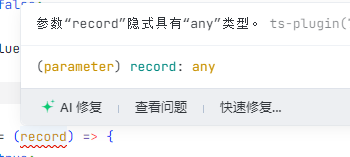
如果你不想太麻烦的给每个变量定义好类型和里面的属性,有几种方式关闭ts的严格模式
方法一:修改 tsconfig.json
{
  "compilerOptions": {
    "strict": false
  }
}
一次性关闭所有严格模式的检查,包括:
strictNullChecksnoImplicitAnystrictFunctionTypes- 等其他所有 strict 模式子选项
方法二:只关闭部分严格选项
{
  "compilerOptions": {
    "strict": true,
    "strictNullChecks": false
  }
}
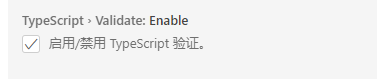
方法三:关闭编译器自带的ts语法检查
打开编译器的设置->搜索validate->找到ts的validate选项关闭即可
严格模式介绍
strictNullChecks
控制是否严格检查
null和undefined
启用时:你不能将
null或undefined赋值给非空类型关闭时:所有类型接受
null或undefined
noImplicitAny
是否禁止隐式的
any类型
启用时:变量或参数没有明确类型时,会报错,强制你声明类型
关闭时:可以不写类型,编译器自动推断为
any
strictFunctionTypes
函数参数类型必须完全匹配(更严格的类型兼容性检查)
- 启用时:传入函数参数时,必须严格类型一致,不允许宽松的类型替代。
type A = (x: number) => void;
type B = (x: number | string) => void;

let a: A;
let b: B;

a = b; // 错误,B 参数更宽松
b = a; // 正确,A 参数更严格
- 关闭时:上述赋值都不会报错
还有一些不常用的严格模式如下:
| 选项名 | 说明 |
|---|---|
strictBindCallApply |
严格检查 .bind()、.call()、.apply() 的参数类型 |
alwaysStrict |
每个文件自动加上 "use strict" 严格模式 |
strictPropertyInitialization |
类的属性必须在构造函数里初始化或加 ! 断言 |
useUnknownInCatchVariables |
catch (err) 默认类型是 unknown 而不是 any |
欢迎指出任何有错误或不够清晰的表达。可以在下面评论区评论,也可以邮件至 1701220998@qq.com
