一、微信登录
1.1 需求分析
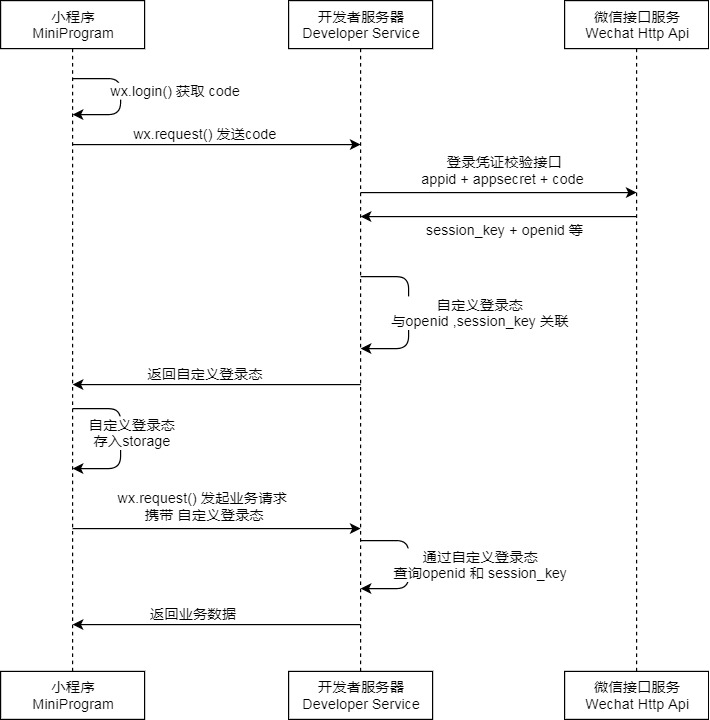
在小程序端实现用户微信登录,需要完成以下流程:
- 小程序获取用户的授权码(
code)。 - 将
code发送给后端。 - 后端携带
appid、appSecret和code调用微信官方登录接口,获取openid和session_key。 - 在数据库中创建用户数据。
- 生成
自定义登录态返回给小程序,小程序本地存储并在后续请求中携带。
存在的问题与需求:
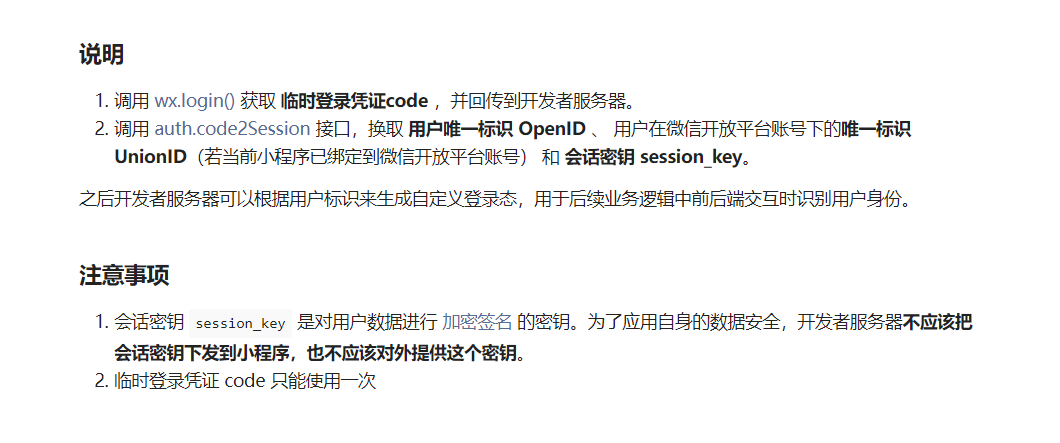
- 每个
code只能使用一次,重复使用会报错。 - 新用户登录需要自动注册并返回主键id。
- 接口调用需要保证
自定义登录态校验有效,防止未授权访问。
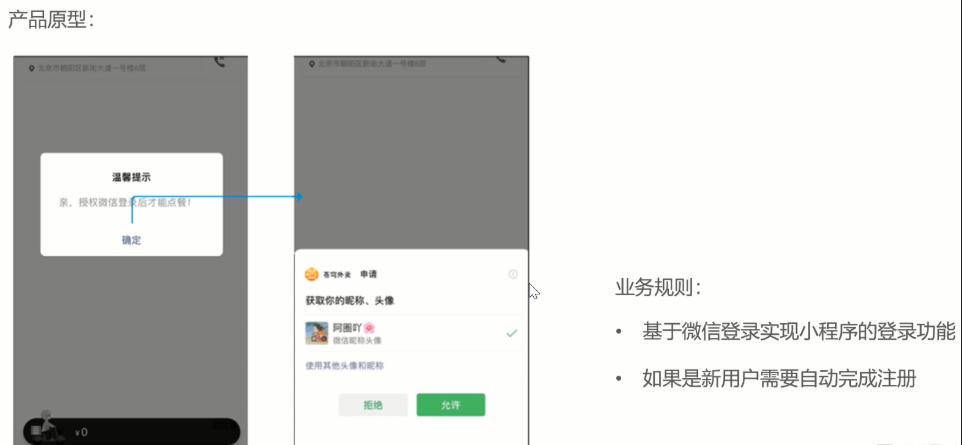
1.1.1 产品原型
1.1.2 接口设计
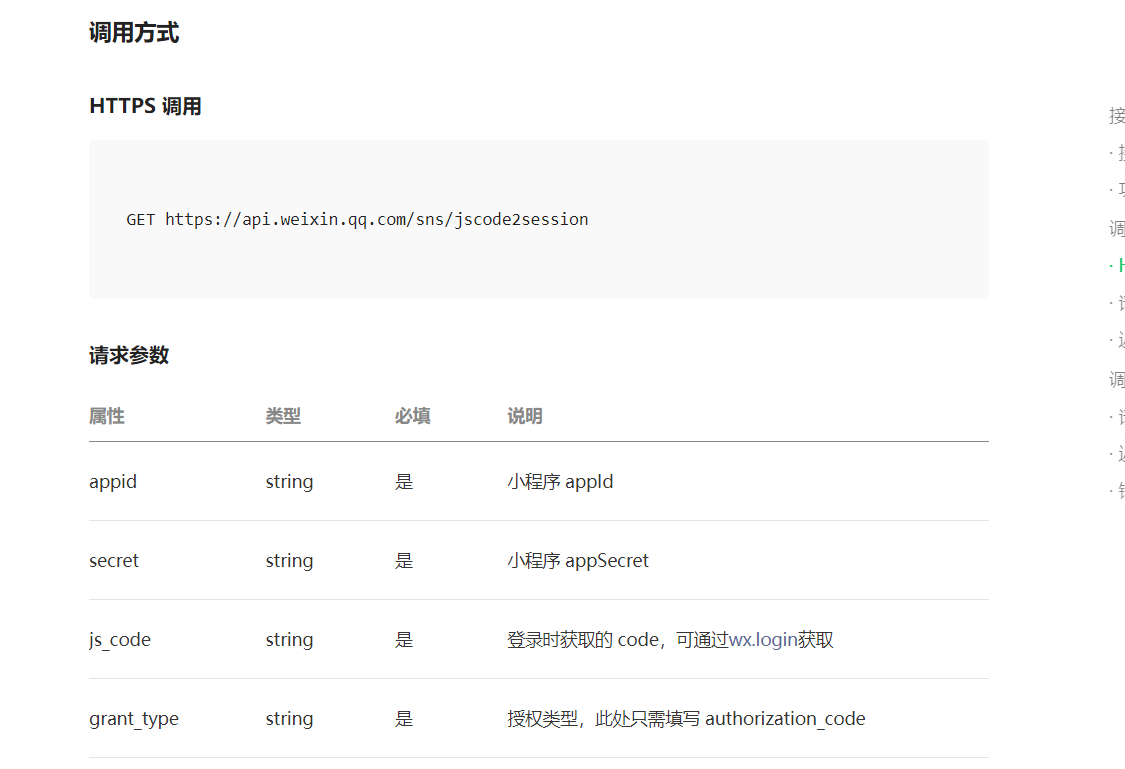
后端请求官方登录效验接口
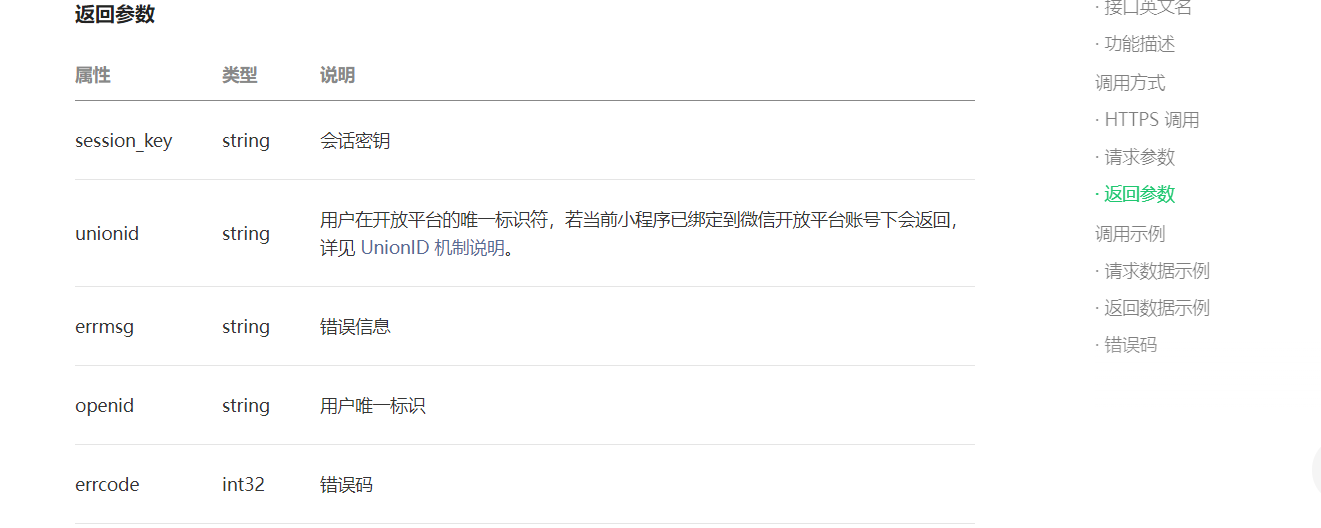
用户登录接口
接口地址:/user/user/login
请求方式:POST
请求数据类型:application/json
请求示例:
{
  "code": ""
}
请求参数:
| 参数名称 | 参数说明 | 请求类型 | 是否必须 | 数据类型 | schema |
|---|---|---|---|---|---|
| userLoginDTO | userLoginDTO | body | true | UserLoginDTO | UserLoginDTO |
| code | false | string |
响应示例:
{
    "code": 0,
    "data": {
        "id": 0,
        "openid": "",
        "token": ""
    },
    "msg": ""
}
1.1.3 实现思路
- 小程序端调用
wx.login()获取code。 - 后端收到
code后,请求微信接口:- 请求地址:
https://api.weixin.qq.com/sns/jscode2session - 请求参数:
appidsecretjs_codegrant_type=authorization_code
- 请求地址:
- 解析返回数据中的
openid。 - 如果数据库不存在该
openid,则自动注册为新用户。 - 为用户生成 JWT 令牌并返回给小程序端。
- 小程序端保存
openid和token,在业务请求时附带token。
1.2 功能实现
1.2.1 微信配置类
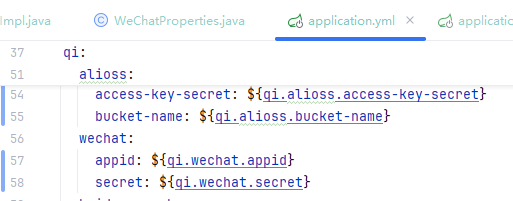
在qi-common的properties包下新建
@Component
@ConfigurationProperties(prefix = "qi.wechat")
@Data
public class WeChatProperties {

    private String appid; //小程序的appid
    private String secret; //小程序的秘钥
    private String mchid; //商户号
    private String mchSerialNo; //商户API证书的证书序列号
    private String privateKeyFilePath; //商户私钥文件
    private String apiV3Key; //证书解密的密钥
    private String weChatPayCertFilePath; //平台证书
    private String notifyUrl; //支付成功的回调地址
    private String refundNotifyUrl; //退款成功的回调地址

}
1.2.2 设计VO
@Data
@Builder
@NoArgsConstructor
@AllArgsConstructor
public class UserLoginVO implements Serializable {
    private Long id;
    private String openid;
    private String token;
}
1.2.3 Controller 层
@RestController
@RequestMapping("/user/user")
@Api(tags="C端用户相关接口")
@Slf4j
public class UserController {

    @Autowired
    private UserService userService;

    @Autowired
    private JwtProperties jwtProperties;

    @PostMapping("/login")
    @ApiOperation("微信登录")
    public Result<UserLoginVO> login(@RequestBody UserLoginDTO userLoginDTO){
        log.info("微信用户登录:{}", userLoginDTO.getCode());

        // 微信登录
        User user = userService.wxlogin(userLoginDTO);

        // 生成 JWT
        HashMap<String, Object> claims = new HashMap<>();
        claims.put(JwtClaimsConstant.USER_ID, user.getId());
        String token = JwtUtil.createJWT(jwtProperties.getUserSecretKey(),
                                         jwtProperties.getUserTtl(),
                                         claims);

        // 封装返回
        UserLoginVO userLoginVO = UserLoginVO.builder()
                .id(user.getId())
                .openid(user.getOpenid())
                .token(token)
                .build();

        return Result.success(userLoginVO);
    }
}
1.2.4 Service 层
public interface UserService {
    User wxLogin(UserLoginDTO userLoginDTO);
}
1.2.5 Service 实现类
@Service
@Slf4j
public class UserServiceImpl implements UserService {

    public static final String WX_LOGIN = "https://api.weixin.qq.com/sns/jscode2session";

    @Autowired
    private WeChatProperties weChatProperties;

    @Autowired
    private UserMapper userMapper;

    @Override
    public User wxlogin(UserLoginDTO userLoginDTO) {
        String openid = getOpenid(userLoginDTO.getCode());

        if (openid == null) {
            throw new LoginFailedException(MessageConstant.LOGIN_FAILED);
        }

        // 查询是否已注册
        User user = userMapper.getByOpenid(openid);

        // 新用户注册
        if (user == null) {
            user = User.builder()
                    .openid(openid)
                    .createTime(LocalDateTime.now())
                    .build();
            userMapper.insert(user);
        }

        return user;
    }

    private String getOpenid(String code) {
        Map<String, String> params = new HashMap<>();
        params.put("appid", weChatProperties.getAppid());
        params.put("secret", weChatProperties.getSecret());
        params.put("js_code", code);
        params.put("grant_type", "authorization_code");

        String json = HttpClientUtil.doGet(WX_LOGIN, params);
        JSONObject jsonObject = JSON.parseObject(json);
        return jsonObject.getString("openid");
    }
}
1.2.6 Mapper 层
@Mapper
public interface UserMapper {

    @Select("select * from user where openid = #{openid}")
    User getByOpenid(String openid);

    void insert(User user);
}
XML 映射文件:
<mapper namespace="com.sky.mapper.UserMapper">
    <insert id="insert" useGeneratedKeys="true" keyProperty="id">
        insert into user (openid, name, phone, sex, id_number, avatar, create_time)
        values (#{openid}, #{name}, #{phone}, #{sex}, #{id_number}, #{avatar}, #{create_time})
    </insert>
</mapper>
1.2.7 Token 校验拦截器
编写拦截器校验小程序端发来的请求携带的token是否合法
@Component
@Slf4j
public class JwtTokenUserInterceptor implements HandlerInterceptor {

    @Autowired
    private JwtProperties jwtProperties;

    public boolean preHandle(HttpServletRequest request, HttpServletResponse response, Object handler) throws Exception {
        if (!(handler instanceof HandlerMethod)) {
            return true;
        }

        String token = request.getHeader(jwtProperties.getUserTokenName());

        try {
            log.info("jwt校验:{}", token);
            Claims claims = JwtUtil.parseJWT(jwtProperties.getUserSecretKey(), token);
            Long userId = Long.valueOf(claims.get(JwtClaimsConstant.USER_ID).toString());
            BaseContext.setCurrentId(userId);
            return true;
        } catch (Exception ex) {
            response.setStatus(401);
            return false;
        }
    }
}
1.3 测试
- 在微信开发者工具导入小程序代码,填写自己的
appid(后续会详细介绍uniapp,这里我们先直接导入)
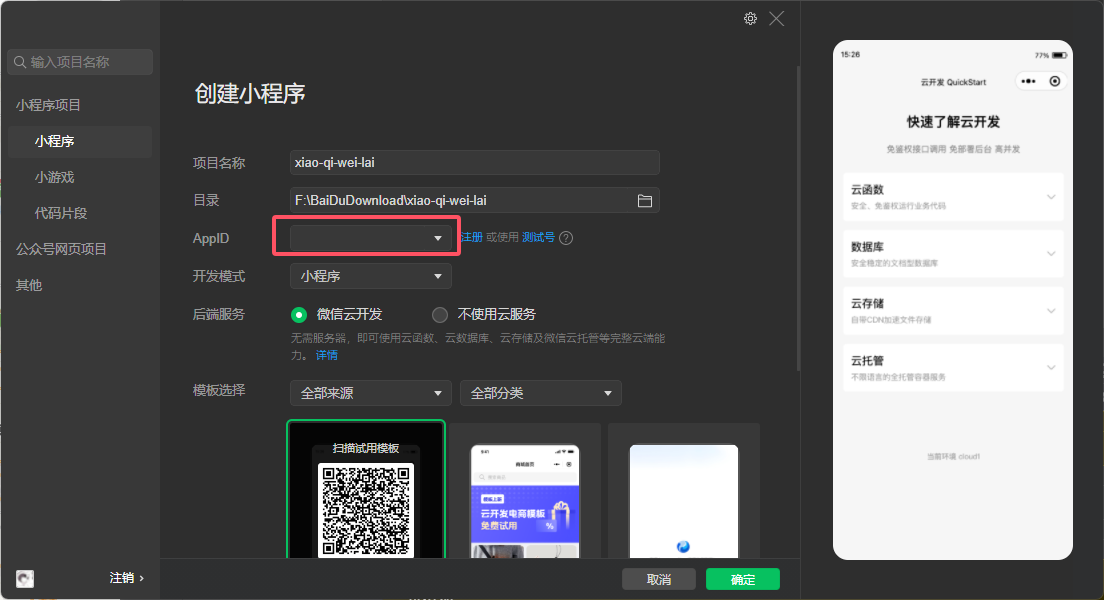
运行登录功能,小程序获取
code并请求后端。后端获取
openid并生成token,数据库记录用户信息。

- 后续业务请求携带
token,后端通过拦截器校验有效性。
二、商品浏览功能
这个部分较之前做过的查询并无较大区别,不再展示代码,这里给出接口设计,可以实操锻炼
2.1 查询分类
接口地址:/user/category/list
请求方式:GET
请求数据类型:application/x-www-form-urlencoded
请求参数:
| 参数名称 | 参数说明 | 请求类型 | 是否必须 | 数据类型 | schema |
|---|---|---|---|---|---|
| type | type | query | false | integer(int32) |
响应参数:
| 参数名称 | 参数说明 | 类型 | schema |
|---|---|---|---|
| code | integer(int32) | integer(int32) | |
| data | array | Category | |
| createTime | string(date-time) | ||
| createUser | integer(int64) | ||
| id | integer(int64) | ||
| name | string | ||
| sort | integer(int32) | ||
| status | integer(int32) | ||
| type | integer(int32) | ||
| updateTime | string(date-time) | ||
| updateUser | integer(int64) | ||
| msg | string |
响应示例:
{
    "code": 0,
    "data": [
        {
            "createTime": "",
            "createUser": 0,
            "id": 0,
            "name": "",
            "sort": 0,
            "status": 0,
            "type": 0,
            "updateTime": "",
            "updateUser": 0
        }
    ],
    "msg": ""
}
2.2 根据分类id查询菜品
接口地址:/user/dish/list
请求方式:GET
请求数据类型:application/x-www-form-urlencoded
请求参数:
| 参数名称 | 参数说明 | 请求类型 | 是否必须 | 数据类型 | schema |
|---|---|---|---|---|---|
| categoryId | categoryId | query | false | integer(int64) |
响应参数:
| 参数名称 | 参数说明 | 类型 | schema |
|---|---|---|---|
| code | integer(int32) | integer(int32) | |
| data | array | DishVO | |
| categoryId | integer(int64) | ||
| categoryName | string | ||
| description | string | ||
| flavors | array | DishFlavor | |
| dishId | integer | ||
| id | integer | ||
| name | string | ||
| value | string | ||
| id | integer(int64) | ||
| image | string | ||
| name | string | ||
| price | number | ||
| status | integer(int32) | ||
| updateTime | string(date-time) | ||
| msg | string |
响应示例:
{
    "code": 0,
    "data": [
        {
            "categoryId": 0,
            "categoryName": "",
            "description": "",
            "flavors": [
                {
                    "dishId": 0,
                    "id": 0,
                    "name": "",
                    "value": ""
                }
            ],
            "id": 0,
            "image": "",
            "name": "",
            "price": 0,
            "status": 0,
            "updateTime": ""
        }
    ],
    "msg": ""
}
2.3 根据分类id查询套餐
接口地址:/user/setmeal/list
请求方式:GET
请求数据类型:application/x-www-form-urlencoded
请求参数:
| 参数名称 | 参数说明 | 请求类型 | 是否必须 | 数据类型 | schema |
|---|---|---|---|---|---|
| categoryId | categoryId | query | false | integer(int64) |
响应参数:
| 参数名称 | 参数说明 | 类型 | schema |
|---|---|---|---|
| code | integer(int32) | integer(int32) | |
| data | array | Setmeal | |
| categoryId | integer(int64) | ||
| createTime | string(date-time) | ||
| createUser | integer(int64) | ||
| description | string | ||
| id | integer(int64) | ||
| image | string | ||
| name | string | ||
| price | number | ||
| status | integer(int32) | ||
| updateTime | string(date-time) | ||
| updateUser | integer(int64) | ||
| msg | string |
响应示例:
{
    "code": 0,
    "data": [
        {
            "categoryId": 0,
            "createTime": "",
            "createUser": 0,
            "description": "",
            "id": 0,
            "image": "",
            "name": "",
            "price": 0,
            "status": 0,
            "updateTime": "",
            "updateUser": 0
        }
    ],
    "msg": ""
}
2.4 根据套餐id查询包含的菜品
接口地址:/user/setmeal/dish/{id}
请求方式:GET
请求数据类型:application/x-www-form-urlencoded
请求参数:
| 参数名称 | 参数说明 | 请求类型 | 是否必须 | 数据类型 | schema |
|---|---|---|---|---|---|
| id | id | path | true | integer(int64) |
响应参数:
| 参数名称 | 参数说明 | 类型 | schema |
|---|---|---|---|
| code | integer(int32) | integer(int32) | |
| data | array | DishItemVO | |
| copies | integer(int32) | ||
| description | string | ||
| image | string | ||
| name | string | ||
| msg | string |
响应示例:
{
    "code": 0,
    "data": [
        {
            "copies": 0,
            "description": "",
            "image": "",
            "name": ""
        }
    ],
    "msg": ""
}
关于微信登录与商品浏览功能就基本实现了,下一章小柒味来 - 菜品套餐缓存与购物车模块实现
欢迎指出任何有错误或不够清晰的表达。可以在下面评论区评论,也可以邮件至 1701220998@qq.com
