一、缓存菜品和套餐
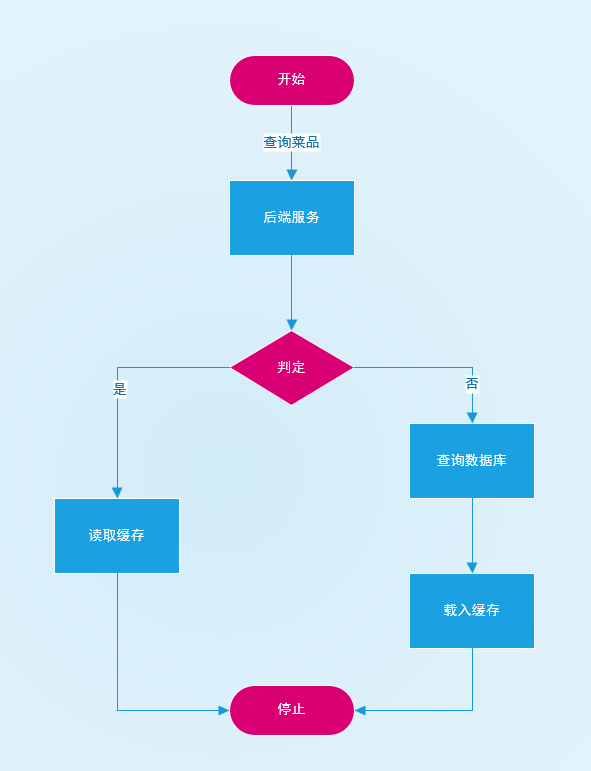
在上一章中我们实现了用户侧的各种查询操作,为减轻数据库查询压力,我们继续使用Redis 缓存菜品、套餐数据,这里顺便介绍两种利用缓存的方式。
1.1 实现逻辑
- 按分类缓存:每个分类下的菜品数据单独保存一份缓存记录。
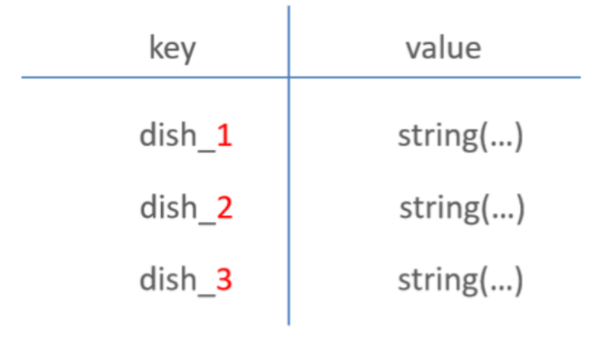
- 当数据库中的菜品数据发生变化(新增、修改、删除)时,清除对应分类的缓存数据,确保缓存与数据库一致。
1.2 流程图
1.3 用户侧代码修改
在com.qi.controller.user包下
1.3.1 菜品查询添加缓存
DishController.java
    @GetMapping("/list")
    @ApiOperation("根据分类id查询菜品")
    public Result<List<DishVO>> list(Long categoryId) {
        String key = "dish_"+categoryId;
        //Redis中是否存在菜品数据
        List<DishVO> list = (List<DishVO>) redisTemplate.opsForValue().get(key);
        if (list!=null && list.size()>0) {
            return Result.success(list);
        }

        Dish dish = new Dish();
        dish.setCategoryId(categoryId);
        dish.setStatus(StatusConstant.ENABLE);//查询起售中的菜品

        //将数据库的查询结果放到Redis中
        list = dishService.listWithFlavor(dish);
        redisTemplate.opsForValue().set(key, list);

        return Result.success(list);
    }
1.3.2 套餐查询添加缓存
这里我们使用Spring Cache来实现,可以对比一下这两个的区别
SetmealController.java
    @GetMapping("/list")
    //@Cacheable,用于查询操作,当缓存中存在数据时,直接从缓存读取;否则将结果写入缓存。
    @Cacheable(cacheNames = "setmealCache", key = "#categoryId")  //key:setmealCache::100
    @ApiOperation("根据分类id查询套餐")
    public Result<List<Setmeal>> list(Long categoryId) {
        Setmeal setmeal = new Setmeal();
        setmeal.setCategoryId(categoryId);
        setmeal.setStatus(StatusConstant.ENABLE);

        List<Setmeal> list = setmealService.list(setmeal);
        return Result.success(list);
    }
这个似乎比Spring Data Redis 方便不少?在文末会介绍介绍它
1.4 管理侧代码修改
在com.qi.controller.admin包下
为保证数据一致性,需要确保数据库数据与缓存数据同步。
当数据库中的数据发生变动时,要及时清除相关缓存,以防页面从缓存中获取到旧数据。
1.4.1 需要清除缓存的业务
- 新增数据
- 删除数据
- 修改数据
1.4.2 实现思路
- 将缓存清除逻辑从具体的 CRUD 方法中抽取出来,封装为单独的方法,便于复用。
- 在对应的增、删、改等业务方法中调用此清除方法。
1.4.3 清除缓存实现
DishController.java
private void clearCache(String pattern){
        Set keys = redisTemplate.keys(pattern);
        redisTemplate.delete(keys);
    }

    @PostMapping
    public Result save(@RequestBody DishDTO dishDTO) {
        log.info("保存菜品:{}", dishDTO);
        dishService.saveWithFlavor(dishDTO);
        //清理指定缓存的数据
        String key="dish_"+dishDTO.getCategoryId();
        clearCache(key);
        return Result.success();
    }
    @DeleteMapping
    @ApiOperation("菜品批量删除")
    public Result delete(@RequestParam List<Long> ids) {
        log.info("菜品批量删除:{}", ids);
        dishService.deleteBatch(ids);
        //将所有以dish_开头的key中的菜品缓存清理掉
        clearCache("dish_*");
        return Result.success();
    }
    @PutMapping
    public Result Update(@RequestBody DishDTO dishDTO) {
        log.info("更新菜品:{}", dishDTO);
        dishService.updateWithFlavor(dishDTO);
        //将所有以dish_开头的key中的菜品缓存清理掉
        clearCache("dish_*");
        return Result.success();
    }
当然少不了SpringCache的清除缓存
SetmealController.java
    @PostMapping
    @CacheEvict(cacheNames = "setmealCache", key = "#setmealDTO.categoryId")
    @ApiOperation("新增套餐")
    public Result save(@RequestBody SetmealDTO setmealDTO) {
        log.info("新增套餐:{}", setmealDTO);
        setmealService.saveWithDish(setmealDTO);
        return Result.success();
    }
    @DeleteMapping
    @CacheEvict(cacheNames = "setmealCache", allEntries = true)
    @ApiOperation("套餐批量删除")
    public Result delete(@RequestParam List<Long> ids) {
        log.info("套餐批量删除:{}", ids);
        setmealService.deleteBatch(ids);
        return Result.success();
    }
    @PutMapping
    @CacheEvict(cacheNames = "setmealCache", allEntries = true)
    @ApiOperation("修改套餐")
    public Result update(@RequestBody SetmealDTO setmealDTO){
        log.info("修改套餐:{}", setmealDTO);
        setmealService.updateWithDishs(setmealDTO);
        return Result.success();
    }
二、购物车模块
普通CRUD,不过多讲解
2.1 接口设计
2.1.1 新增购物车物品
接口地址:/user/shoppingCart/add
请求方式:POST
请求数据类型:application/json
请求示例:
{
  "dishFlavor": "",
  "dishId": 0,
  "setmealId": 0
}
请求参数:
| 参数名称 | 参数说明 | 请求类型 | 是否必须 | 数据类型 | schema |
|---|---|---|---|---|---|
| shoppingCartDTO | shoppingCartDTO | body | true | ShoppingCartDTO | ShoppingCartDTO |
| dishFlavor | false | string | |||
| dishId | false | integer(int64) | |||
| setmealId | false | integer(int64) |
响应参数:
| 参数名称 | 参数说明 | 类型 | schema |
|---|---|---|---|
| code | integer(int32) | integer(int32) | |
| data | object | ||
| msg | string |
响应示例:
{
    "code": 0,
    "data": {},
    "msg": ""
}
2.1.2 清空购物车
接口地址:/user/shoppingCart/clean
请求方式:DELETE
请求数据类型:application/x-www-form-urlencoded
请求参数:
响应参数:
| 参数名称 | 参数说明 | 类型 | schema |
|---|---|---|---|
| code | integer(int32) | integer(int32) | |
| data | object | ||
| msg | string |
响应示例:
{
    "code": 0,
    "data": {},
    "msg": ""
}
2.1.3 查询购物车列表
接口地址:/user/shoppingCart/list
请求方式:GET
请求数据类型:application/x-www-form-urlencoded
请求参数:
响应参数:
| 参数名称 | 参数说明 | 类型 | schema |
|---|---|---|---|
| code | integer(int32) | integer(int32) | |
| data | array | ShoppingCart | |
| amount | number | ||
| createTime | string(date-time) | ||
| dishFlavor | string | ||
| dishId | integer(int64) | ||
| id | integer(int64) | ||
| image | string | ||
| name | string | ||
| number | integer(int32) | ||
| setmealId | integer(int64) | ||
| userId | integer(int64) | ||
| msg | string |
响应示例:
{
    "code": 0,
    "data": [
        {
            "amount": 0,
            "createTime": "",
            "dishFlavor": "",
            "dishId": 0,
            "id": 0,
            "image": "",
            "name": "",
            "number": 0,
            "setmealId": 0,
            "userId": 0
        }
    ],
    "msg": ""
}
2.1.4 删除购物车中一个商品
接口地址:/user/shoppingCart/sub
请求方式:POST
请求数据类型:application/json
请求示例:
{
  "dishFlavor": "",
  "dishId": 0,
  "setmealId": 0
}
请求参数:
| 参数名称 | 参数说明 | 请求类型 | 是否必须 | 数据类型 | schema |
|---|---|---|---|---|---|
| shoppingCartDTO | shoppingCartDTO | body | true | ShoppingCartDTO | ShoppingCartDTO |
| dishFlavor | false | string | |||
| dishId | false | integer(int64) | |||
| setmealId | false | integer(int64) |
响应参数:
| 参数名称 | 参数说明 | 类型 | schema |
|---|---|---|---|
| code | integer(int32) | integer(int32) | |
| data | object | ||
| msg | string |
响应示例:
{
    "code": 0,
    "data": {},
    "msg": ""
}
2.2 实现逻辑
在添加商品到购物车时,需要进行如下处理:
- 检查是否已存在相同菜品/套餐
- 查询购物车表中是否已存在相同的菜品或套餐记录。
- 存在
- 将该记录的数量字段更新为原数量 + 1。
- 不存在
- 判断当前添加项是菜品还是套餐。
- 按对应类型插入新记录到购物车表,初始数量为1。
2.3 功能实现
2.3.1 设计DTO
@Data
public class ShoppingCartDTO implements Serializable {
    private Long dishId;
    private Long setmealId;
    private String dishFlavor;
}
2.3.2 Controller 层
@Slf4j
@RestController
@RequestMapping("/user/shoppingCart")
@Api(tags = "C端-购物车接口")
public class ShoppingCartController {
    @Autowired
    private ShoppingCartService shoppingCartService;

    @PostMapping("/add")
    @ApiOperation("新增购物车物品")
    public Result add(@RequestBody ShoppingCartDTO shoppingCartDTO){
        log.info("新增购物车物品:{}", shoppingCartDTO);
        shoppingCartService.addShoppingCart(shoppingCartDTO);
        return Result.success();
    }

    @GetMapping("/list")
    @ApiOperation("查询购物车列表")
    public Result<List<ShoppingCart>> list(){
        log.info("查询购物车列表");
        List<ShoppingCart> list = shoppingCartService.showShoppingCart();
        return Result.success(list);
    }

    @DeleteMapping("/clean")
    @ApiOperation("清空购物车")
    public Result clean(){
        log.info("清空购物车");
        shoppingCartService.cleanShoppingCart();
        return Result.success();
    }

    @PostMapping("/sub")
    @ApiOperation("删除购物车中一个商品")
    public Result deleteByDishIdOrSetmealId(@RequestBody ShoppingCartDTO shoppingCartDTO){
        log.info("删除指定商品");
        shoppingCartService.deleteByDishIdOrSetmealId(shoppingCartDTO);
        return Result.success();
    }
}
2.3.3 Service 层
public interface ShoppingCartService {

    void addShoppingCart(ShoppingCartDTO shoppingCartDTO);

    List<ShoppingCart> showShoppingCart();

    void cleanShoppingCart();

    void deleteByDishIdOrSetmealId(ShoppingCartDTO shoppingCartDTO);
}
2.3.4 Service 实现类
@Service
public class ShoppingCartSericeImpl implements ShoppingCartService {

    @Autowired
    private ShoppingCartMapper shoppingCartMapper;

    @Autowired
    private DishMapper dishMapper;

    @Autowired
    private SetmealMapper setmealMapper;

    /**
     * 将商品添加到购物车
     * <p>
     * 该方法首先会根据传入的ShoppingCartDTO对象创建一个ShoppingCart对象,并复制相关属性
     * 然后获取当前用户ID,设置为购物车商品的用户ID
     * 接着,会查询购物车中是否已存在该商品,如果存在,则更新商品数量;如果不存在,则插入新的购物车记录
     *
     * @param shoppingCartDTO 购物车DTO对象,包含要添加到购物车的商品信息
     */
    public void addShoppingCart(ShoppingCartDTO shoppingCartDTO) {
        // 创建一个新的ShoppingCart对象,并从DTO中复制属性
        ShoppingCart shoppingCart = new ShoppingCart();
        BeanUtils.copyProperties(shoppingCartDTO, shoppingCart);

        // 获取当前用户ID,并设置为购物车商品的用户ID
        Long currentId = BaseContext.getCurrentId();
        shoppingCart.setUserId(currentId);

        // 查询购物车中是否已存在该商品
        List<ShoppingCart> list = shoppingCartMapper.list(shoppingCart);

        if (list != null && list.size() > 0) {
            // 如果购物车中已存在该商品,获取第一个商品对象,并增加其数量
            ShoppingCart cart = list.get(0);
            cart.setNumber(cart.getNumber() + 1);

            // 更新数据库中该商品的数量
            shoppingCartMapper.updateNumberById(cart);
        } else {
            // 如果购物车中不存在该商品,根据传入的菜品ID或套餐ID获取商品信息,并设置到ShoppingCart对象中
            Long dishId = shoppingCartDTO.getDishId();
            if (dishId != null) {
                // 本次添加到购物车的是菜品
                Dish dish = dishMapper.getById(dishId);
                shoppingCart.setName(dish.getName());
                shoppingCart.setImage(dish.getImage());
                shoppingCart.setAmount(dish.getPrice());

            } else {
                // 本次添加到购物车的是套餐
                Long setmealId = shoppingCartDTO.getSetmealId();
                Setmeal setmeal = setmealMapper.getById(setmealId);
                shoppingCart.setName(setmeal.getName());
                shoppingCart.setImage(setmeal.getImage());
                shoppingCart.setAmount(setmeal.getPrice());
            }
            // 设置商品数量为1,并设置创建时间为当前时间
            shoppingCart.setNumber(1);
            shoppingCart.setCreateTime(LocalDateTime.now());

            // 插入新的购物车记录到数据库
            shoppingCartMapper.insert(shoppingCart);
        }
    }

    @Override
    public List<ShoppingCart> showShoppingCart() {
        Long userId = BaseContext.getCurrentId();
        ShoppingCart shoppingCart = ShoppingCart.builder()
                .userId(userId)
                .build();
        List<ShoppingCart> list = shoppingCartMapper.list(shoppingCart);
        return list;
    }

    @Override
    public void cleanShoppingCart() {
        Long userId = BaseContext.getCurrentId();
        shoppingCartMapper.deleteByUserId(userId);
    }

    @Override
    public void deleteByDishIdOrSetmealId(ShoppingCartDTO shoppingCartDTO) {

        shoppingCartMapper.deleteByDishIdOrSetmealId(shoppingCartDTO);
    }

}
2.3.5 Mapper 层
@Mapper
public interface ShoppingCartMapper {

    List<ShoppingCart> list(ShoppingCart shoppingCart);

    @Update("update shopping_cart set number = #{number} where id = #{id}")
    void updateNumberById(ShoppingCart shoppingCart);

    @Insert("insert into shopping_cart (name, image, user_id, dish_id, setmeal_id, dish_flavor, number, amount, create_time) VALUES" +
            " (#{name}, #{image}, #{userId}, #{dishId}, #{setmealId}, #{dishFlavor}, #{number}, #{amount}, #{createTime})")
    void insert(ShoppingCart shoppingCart);

    @Delete("delete from shopping_cart where user_id = #{userId}")
    void deleteByUserId(Long userId);

    void deleteByDishIdOrSetmealId(ShoppingCartDTO shoppingCartDTO);
}
ShoppingCartMapper.xml
<?xml version="1.0" encoding="UTF-8" ?>
<!DOCTYPE mapper PUBLIC "-//mybatis.org//DTD Mapper 3.0//EN"
        "http://mybatis.org/dtd/mybatis-3-mapper.dtd" >
<mapper namespace="com.qi.mapper.ShoppingCartMapper">
    <delete id="deleteByDishIdOrSetmealId">
        delete from shopping_cart
        <where>
            <if test="dishId != null">
                and dish_id = #{dishId}
            </if>
            <if test="setmealId != null">
                and setmeal_id = #{setmealId}
            </if>
        </where>
    </delete>


    <select id="list" resultType="com.qi.entity.ShoppingCart">
        select * from shopping_cart
        <where>
            <if test="userId!=null">
                and user_id = #{userId}
            </if>
            <if test="setmealId!=null">
               and setmeal_id = #{setmealId}
            </if>
            <if test="dishId!=null">
               and dish_id = #{dishId}
            </if>
            <if test="dishFlavor!=null">
               and dish_flavor = #{dishFlavor}
            </if>
        </where>

    </select>
</mapper>
三、知识点补充
3.1 Spring Cache
- 定位:是 Spring 提供的一个缓存抽象框架,本身不做具体缓存存储,只负责定义缓存的标准用法。
- 作用:通过注解在方法级别实现缓存逻辑。
- 特点:
- 只是统一 API,具体缓存由底层实现决定(Redis、EhCache、Caffeine 等)。
- 开箱即用的注解方式,不用自己写
RedisTemplate操作代码。
- 关键点:你需要在
application.yml里指定spring.cache.type=redis,Spring Cache 才会使用 Redis 作为底层存储。
| 注解 | 说明 |
|---|---|
@EnableCaching |
开启缓存注解功能,通常加在启动类上。 |
@Cacheable |
方法执行前会先检查缓存中是否存在数据:如果存在,则直接返回缓存数据;如果不存在,则执行方法并将返回结果放入缓存中。 |
@CachePut |
将方法的返回值直接放入缓存中(无论缓存中是否已有数据)。 |
@CacheEvict |
从缓存中删除一条或多条数据。 |
3.2 Spring Data Redis
- 定位:是 Spring 对 Redis 客户端(Jedis、Lettuce 等)的封装,提供操作 Redis 的 API。
- 作用:直接让你在代码中用
RedisTemplate进行读写 Redis 数据。 - 特点:
- 不限于缓存,可以做分布式锁、消息队列、计数器等。
- 完全由你控制 key、value 的存储格式和序列化方式。
- 需要自己写 CRUD 代码,没有 Spring Cache 那种注解就缓存的自动化。
关于菜品缓存和购物车模块就基本实现了,下一章小柒味来 - 用户下单相关功能开发
欢迎指出任何有错误或不够清晰的表达。可以在下面评论区评论,也可以邮件至 1701220998@qq.com
